When it comes to the visual design of your forms, you have all the options available to you with websites. You define the design with CSS and HTML and are completely flexible here. In order for the forms to be able to transfer data to the database or read data from it, certain values must be set and database columns (profile fields) linked.
The following sections explain how to do this.
11.4.1 Form basics
There are basically no limits to the structure of the content. But a few things are good to know:
Open the form part in HTML with the following expression:
If you want to save data in a recipient profile, you must tell the OpenEMM in the background which CompanyID your client is. So that this cannot be read in plain text, there is a so-called CTOKEN for this, which is an encrypted value for the ComanyID. You can find the CTOKEN e.g. in the URLs of existing forms. In the form you can store this with the following expression - instead of xxxxxx you insert your CTOKEN:
If you want to call up another OpenEMM form directly after submitting the form, use the following expression and replace the placeholder form_name with the name of the desired form in agnFN:
If it is a registration form, you have to give the OpenEMM more information. Firstly, for which mailing list (agnMAILINGLIST) the recipient is to be subscribed, which mail format (mailtype) he/she is to receive and which status (agnSUBSCRIBE) he/she is to receive. You can find the ID of your mailing list in the overview of mailing lists and insert it instead of xxxxx. The mail format is usually HTML (= 1) and the recipient status should be set to active (= 1) after confirmation:
You can embed other fields that are to be filled in the background in the same way by entering the field name in the database under name and storing the desired contents for value. Example:
Form fields that are to be filled by the caller itself could look like this:
It is important that the name parameter uses the field name from the OpenEMM database, in this example FIRSTNAME. In this way, the input field of the form is assigned to the corresponding field in the recipient database.
Date fields must be divided into three individual input fields for day, month, and year. The field names are always according to the following scheme: FIELDNAME_DAY_DATE, FIELDNAME_MONTH_DATE, FIELDNAME_YEAR_DATE. Example of a date field birthday:
Day: Month: Year:
11.4.2 Drop-down list instead of entry field
Some data is saved in the profile database as a reference number, for instance gender or mail format. It is impossible to ask a subscriber to enter the relevant numerical data on registration. This would not only cause many errors, but will also prompt some people to enter invalid data on purpose. It is much more elegant to offer subscribers a drop-down list for parameter selection - with speaking entries. To do this, the tags and are used to define a drop-down list in the HTML form. The following example is suitable for gender selection.
In the first line, the tag with the name="GENDER" attribute determines that the drop-down list concerns the OpenEMM database field for gender. This is a required field since without a gender, OpenEMM cannot process entries correctly.
Fig. 10.5: In this way a selection list for the gender can be created.
The following lines starting with define the possible selections in the drop-down list. There is one tag per selection. Each tag is attributed a value="" which will be used by OpenEMM to determine which entry to make in the profile database. In our example, we used 0 for male, 1 for female and 2 for no entry.
But what happens if the subscriber does not make a selection? You will define a default entry for this situation. In our example, when evaluating the form the default value will be No entry. This is why the selected attribute is shown against that selection’s tag. This also means that the entry is the default form entry and visible at form call-up.
When defining other selections, for instance the mail format or entries for fields you defined yourself, you must adapt the following data:
The field name in the name attribute.
The values (value="") and text for all drop-down list selections (). There is no limit to the number of selections you may insert.
11.4.3 Displaying existing data
Empty fields in the OpenEMM should not always be filled with a new content, as is the case when a new recipient is registered. There are also numerous use cases in which the data of an existing recipient profile should be loaded and displayed in the form, for example, if a recipient wants to make data corrections or additions.
Three points must be met before you can call up the data from an existing recipient profile:
The form must be called up with an existing User ID, otherwise the OpenEMM does not know which data it should display.
The form requires an introductory trigger that retrieves the profile data.
The profile field to be displayed is extended with the script command $customerData.
In the case of a simple input field, such as the first name, the call looks like this:
First name:
When outputting an existing profile, the correct point must also be marked in a selection list. To do this, you must insert the attribute selected in the HTML code in the corresponding tag. The same applies to a checkbox, where the attribute checked creates a check mark. You use script commands to insert the attributes in the correct place, depending on the recipient profile. The example for displaying the mail format in a selection list looks like this:
Mail-Format:
The list option selected in the browser window must have the selected attribute against its value. First, the #if query checks whether or not the value stored in the database is plausible for the list option concerned. The $customerData.MAILTYPE code calls up the value stored in the profile. MAILTYPE is the name of the field where OpenEMM stores the mail type (text, HTML or Offline-HTML) selected by the recipient. If the value selected and the value found are identical, the script command inserts the text from the ‘if’ query immediately before #end into the HTML code. For instance,
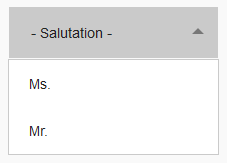 Fig. 10.5: In this way a selection list for the gender can be created.