4.7 Forms of salutation
You choose whether to greet your customers more formally or whether you prefer a more relaxed style of address. E-Marketing Manager allows you to save your chosen form of salutation and to use it with your next mailing to greet customers. The system distinguishes between male and female recipients as well as those whose sex is unknown. To define a new form of salutation, proceed as follows:
-
Click on the Mailings tab in the navigation bar, then on the Forms of salutation submenu. A list of defined forms of address is displayed.
-
To create a new entry, click on the New button. E-Marketing Manager opens an entry dialog with several input fields.
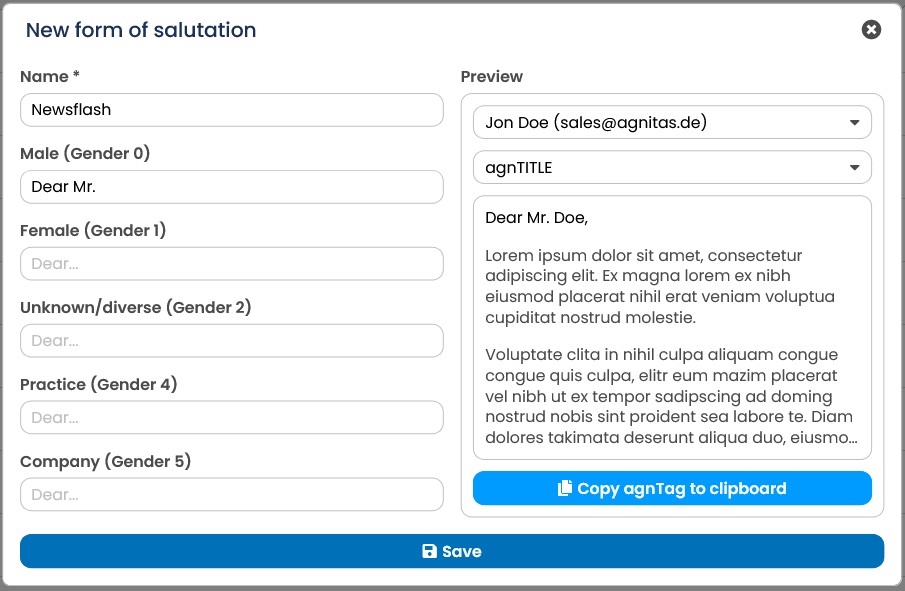
Fig. 6.1: A form of salutation has five possible greetings: one for female recipients, one for male recipients, one for recipients whose gender is unknown and two for recipients without gender.
-
In the Name field, enter a meaningful name.
-
Enter your selected greetings into the fields under ... (Gender x). The profile database stores each recipient together with his or her sex (GENDER field). Male recipients are assigned 0, female recipients have a gender of 1 and 3. Any recipients whose sex is unknown or diverse are assigned a gender of 2, 4 and 5 are for recipients that are either a company or a pratice. There is one field per gender. For our example, we have selected the greetings Dear Mr. , Dear Mrs. and the neutral form of address Dear Customer. When sending out the mailing, each e-mail is completed by a greeting, a title (if applicable) as well as the last name.
-
Once you have entered your texts, click on the Save button. The new entry is now displayed in the Forms of salutation overview. The first column contains the ID for this form of address. E-Marketing Manager assigns this ID automatically. It is used to select a form of salutation (see chapter Creating customized mailings).
-
Next to the entry fields, you will see a recipient-specific preview. You can also copy the salutation to the clipboard as an agnTag in order to insert the salutation directly into a mailing.
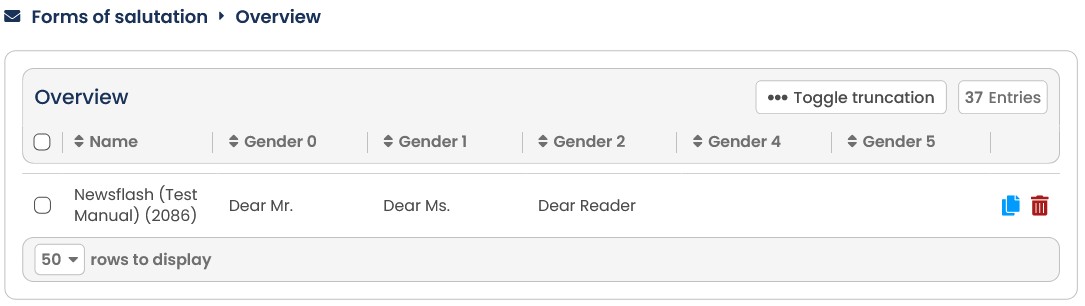
Fig. 6.2: The new form of salutation is now ready for use.
Note: If you want to use complex forms of salutation such as The Honorable Mr./Mrs./Ms. Justice X, AGNITAS Support will be glad to help you.
If the authorization Extended title is enabled for your users, you can create your own complex forms of title in the title field. To do so, you must use scripts according to the following schematic.
-
A #\<># at the beginning of the entry acts as a recognition symbol.
-
\$type (numerical value, if the tag is agnTITLE it has the value 0, if it is agnTITLEFULL it has the value 1 and for agnTITLEFIRST the value is 2).
-
\$gender (GENDER from the database)
-
\$title (TITLE from the database, only set for agnTITLE and agnTITLEFULL).
-
\$firstname (FIRSTNAME from the database, only set for agnTITLEFULL and agnTITLEFIRST).
-
\$lastname (LASTNAME from the database, only set for agnTITLE and agnTITLEFULL).
-
\$cust.\<feldname>, if further profile fields are to be read in.
Example: #\<>#Dear #if(\$title=="") #if(\$type!=1) Mr. #end \$firstname #else \$title #end
\$lastname becomes Dear Dr. John Doe, if a title exists, otherwise Dear Mr. John Doe. Also note that in the input field for women you must then replace Mr. with Ms. accordingly.
You can now include the desired form of salutation in your mailing. It does not matter whether you have defined it yourself or whether it already exists. The E-Marketing Manager provides you with various tags for this purpose - see Appendix A: AGNITAS tags. All you have to do is decide whether you want to address the recipient by first name, last name or a combination of first and last name.
The three tags agnTITLE, agnTITLEFIRST and agnTITLEFULL can be used. Assuming
you want to greet your recipient with Hello Mr. John Doe, then select the tag agnTITLEFULL. For the type parameter, output the ID of the desired salutation type. In our example, the predefined salutation types with the ID 13 or 14 are suitable for this. These differ only in the greeting of recipients without gender information or a diverse gender. If you want to do without Mr. or Mrs. in your salutation, then create your own salutation type for this, in which you only enter Hello for both men and women and define any greeting formula for the neutral salutation, e.g. Hello dear reader. In our example, the complete tag in the mailing would look like this: [agnTITLEFULL type="14"/].