10.8 Domain statistics
Additionally, you have the option of displaying all recipients according to their service provider or e-mail domain. It could be interesting for you to find out how many of your customers have their e-mail address with BT, GMX or AOL, or whether a lot of recipients belong to a single company like Siemens or BMW. You may want to create a special mailing for that group of recipients.
E-mail addresses follow a common format: name@domain.de. The domain overview shows you, how many recipients have one specific domain.
-
This function is called up via the Statistics button in the navigation bar and the submenu Domain Overview.
-
Two drop-down lists allow you to restrict recipients to mailings lists and/or target groups.
-
In the Max. number of domains drop-down menu, select whether E-Marketing
Manager should display the top 5, top 10, top 15, top 20, top 25 or top 50 of all domains.
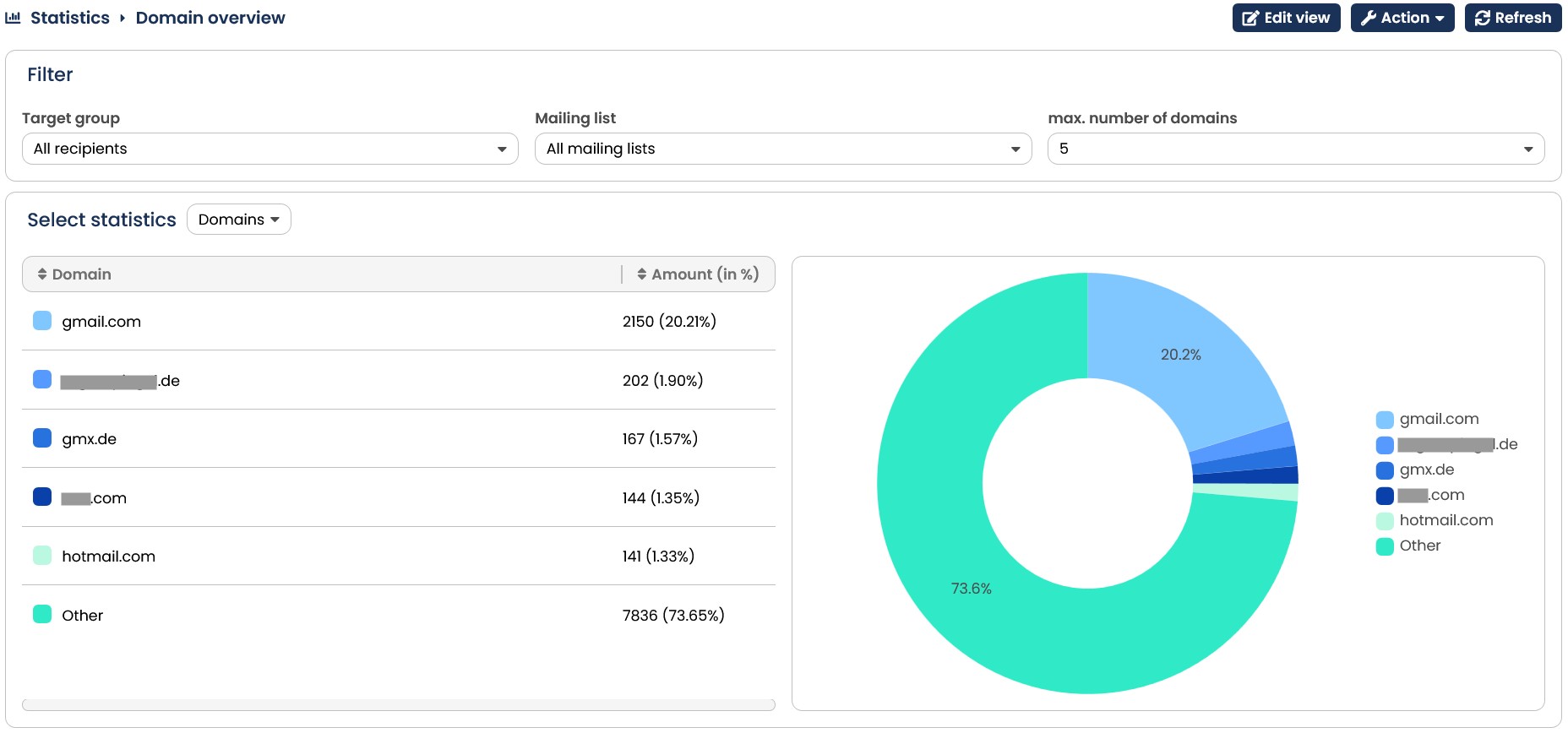
Fig. 9.23: The overview displays, which domains your recipients use.
Furthermore the E-Marketing Manager provides you with the possibility to check on the toplevel domains. Simply use the drop-down menu next to Select statistics and choose Top Level Domains. In the Target Groups area you can again set the Mailing list, Target group as well as Max. number of domains. Also you can export the top-level domain statistics as CSV when clicking on the Action button in the upper right.
Note: The statistic only includes recipients of mailing lists to which you are assigned.