10.7 Device Overview
You can use the device overview to review the end devices that were most often used to open your mailing or click on it. Thereby, you can filter the end devices more precisely based on a mailing list or previously defined target group. Using the Max. End Device Count drop-down list, you can choose if you would like to display the 10, 20 or 50 end devices most frequently used.
if you select End Devices in the overview, the EMM first shows you a table with the most frequently used end devices within the last 90 days. Since desktop devices do not transmit a device ID, the operating system used is displayed instead.
The ten most frequently used end devices will be represented in color based on their percentage values and in relation to the opening share and click share using a pie chart.
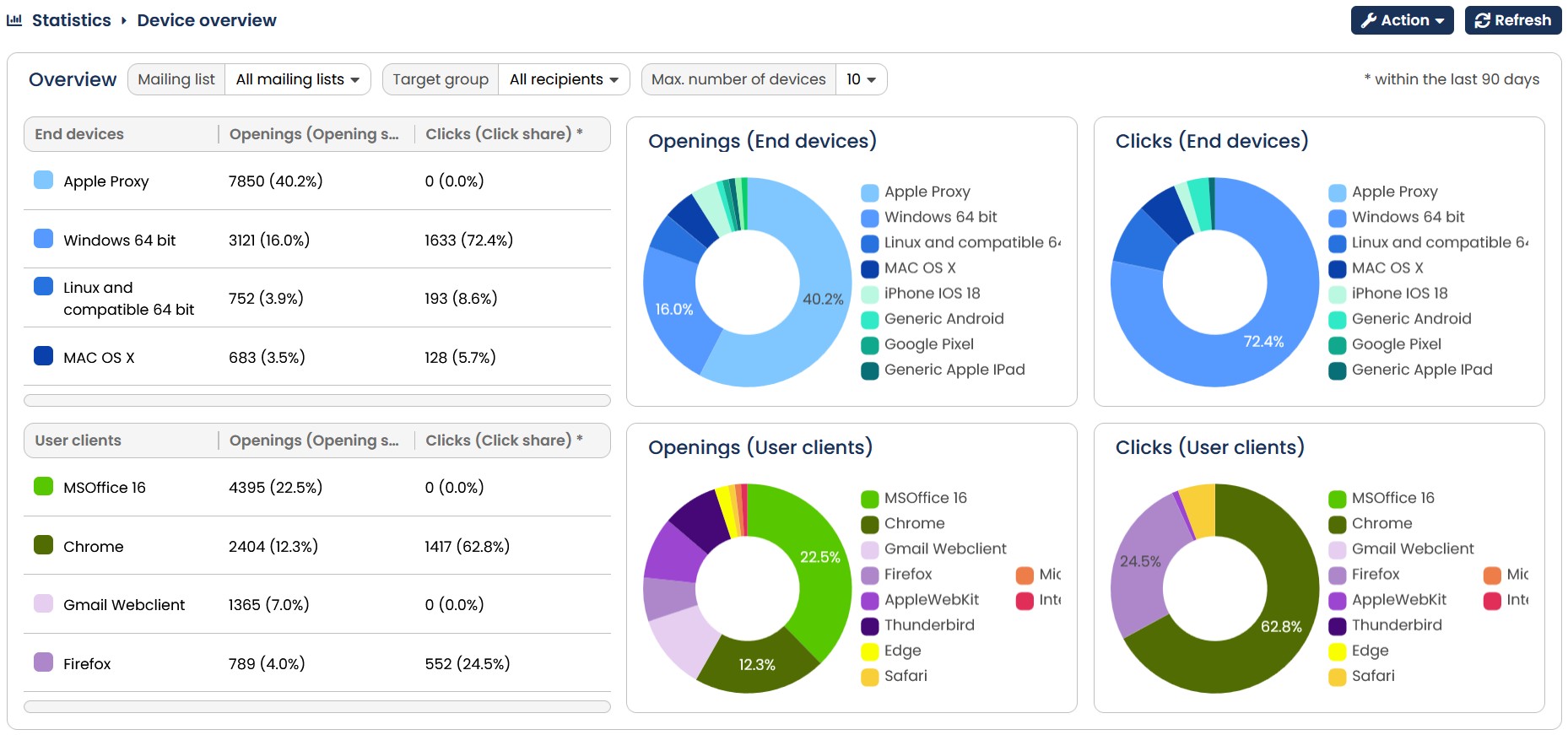
Fig. 9.22: The end device overview grants you an overview about the most important end devices with which your mailing was opened.
If you select User clients in the drop-down menu, you can check which clients your recipients have used to open or click on the mails in the last 90 days.
Note: The statistic only includes recipients of mailing lists to which you are assigned.