2 Introduction
If your EMM instance has been already installed and you want to upgrade the current version, you may directly jump to chapter EMM Updates and Upgrades.
2.1 Overview
EMM is a web-based enterprise application for email marketing, email newsletters, service emails (transaction emails and event or time triggered emails), marketing automation and lead management. To summarize it, EMM is a tool for customer relationship management by email.
EMM offers tons of features for professional marketing users, among them:
- a console based administration tool for checks, configuration, updates and backups (EST)
- a responsive web user interface with great usability and different languages
- a mail template management system
- a central media pool for mailing images, PDF files, etc.
- a visual web form builder
- mailing, template and web forms export and import to load prepared data and to exchange data between tenants
- ability to fill mail templates with data from databases and realtime content created on-the-fly
- a graphical workflow manager to create complex campaigns with drag&drop
- individual and (GDPR compliant) anonymous tracking of mail openings, link clicks and deep tracking
- configurable database cleaner jobs to fulfill GDPR requirement of data minimization
- automated bounce management
- graphical realtime statistics with lots of KPIs and configurable reports (PDF and CSV)
- customer insights analysis based on all recipients or single recipients
- a marketing intelligence analyzer
- self-defined target groups based on recipient profiles, recipient's status and behaviour as well as recipient's end user devices and clients (created visually or with SQL-like syntax)
- a scalable multiqueue mail backend for maximum sending performance
- capability to prioritize mailings and to limit the number of mails sent to a user per day
- capability to assign access to certain recipient data to certain users groups only
- the ability to create your own customized database structure (voucher codes, product information, etc.)
- flexibly configurable data import and export with extensive reporting of results
- predefined triggers that can be accessed by HTTPS and can be registered as webhooks for 3rd party systems
- a scripting feature to enhance the functionality of EMM with customized triggers
- for automatic data exchange with 3rd party systems: a powerful automation feature for imports and exports of recipient data, mailing data, daily reaction data and other data via SFTP file server
- sophisticated management of users, user roles, user rights and supervisors (for multi-tenant environments)
- an audit-proof searchable and exportable user activity log
- a system status menu with helpful info and configuration options for EMM administrators
- the possibility to send only transport encrypted emails (optional premium feature)
- an integrated drag&drop CMS for responsive mailings with a media pool (optional premium feature)
- an extensive set of SOAP webservices including methods for bulk operations to manage EMM from remote (optional premium feature)
- a feature-rich RESTful API including methods for bulk operations to manage EMM from remote (optional premium feature)
- a callback API to register webhooks for notifications of 3rd party systems about various mailing and recipient events (optional premium feature)
- connectors for integration plaforms Make and N8N (requires webhooks)
- an SMTP API to run emails from legacy systems through EMM to convert them to template-based HTML mails with SPF, DKIM, DMARC, bounce management, opening and link tracking, etc. (optional premium feature)
The GUI of EMM works with web browsers Google Chrome, Mozilla Firefox and Microsoft Edge. To give you an impression of the web-based user interface of EMM, the following two screenshots illustrate the configurable dashboard and how to build workflows and campaigns with EMM:
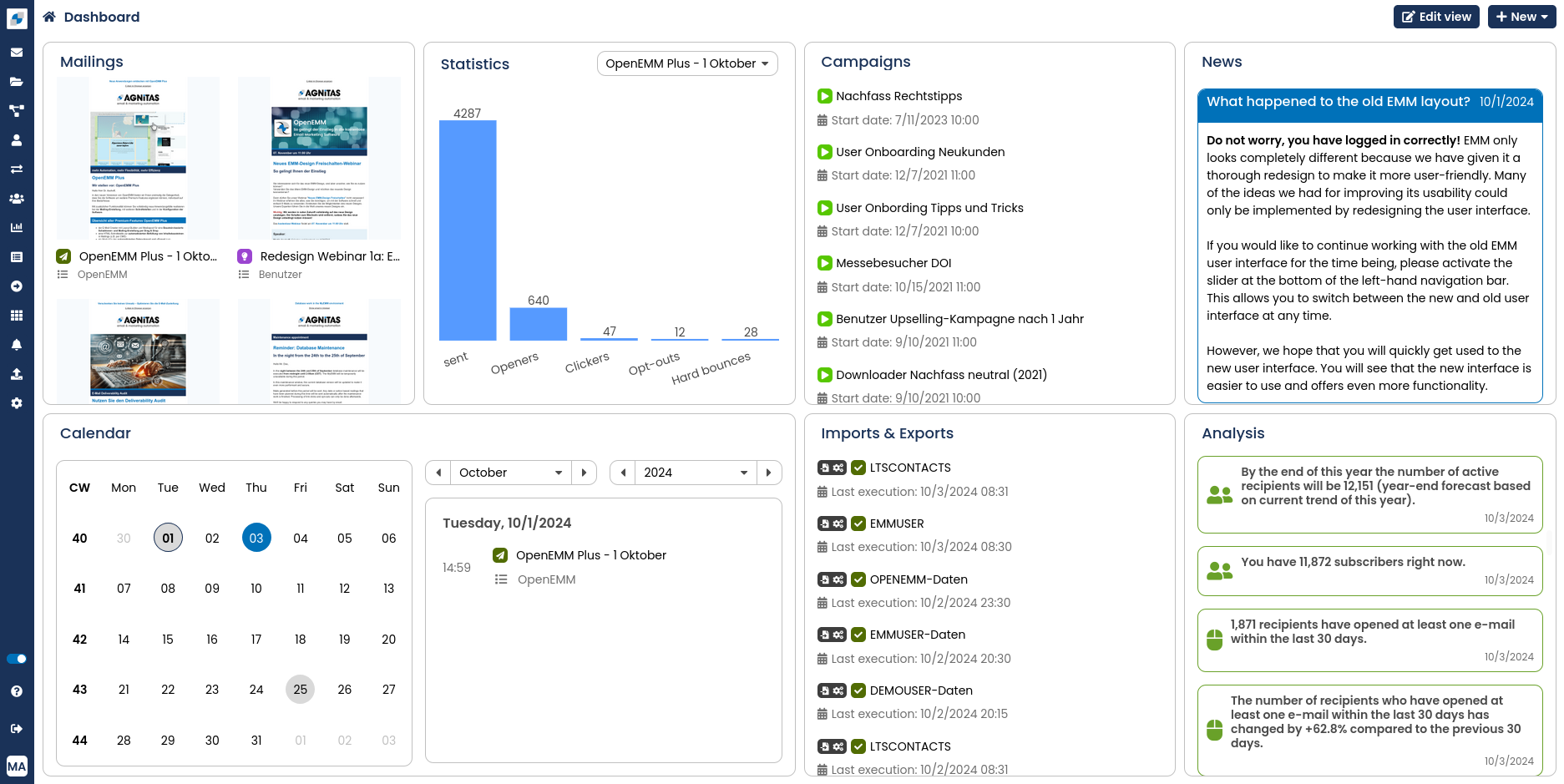
EMM dashboard with latest mailings, planning calendar, status of active campaigns, statistics, etc.
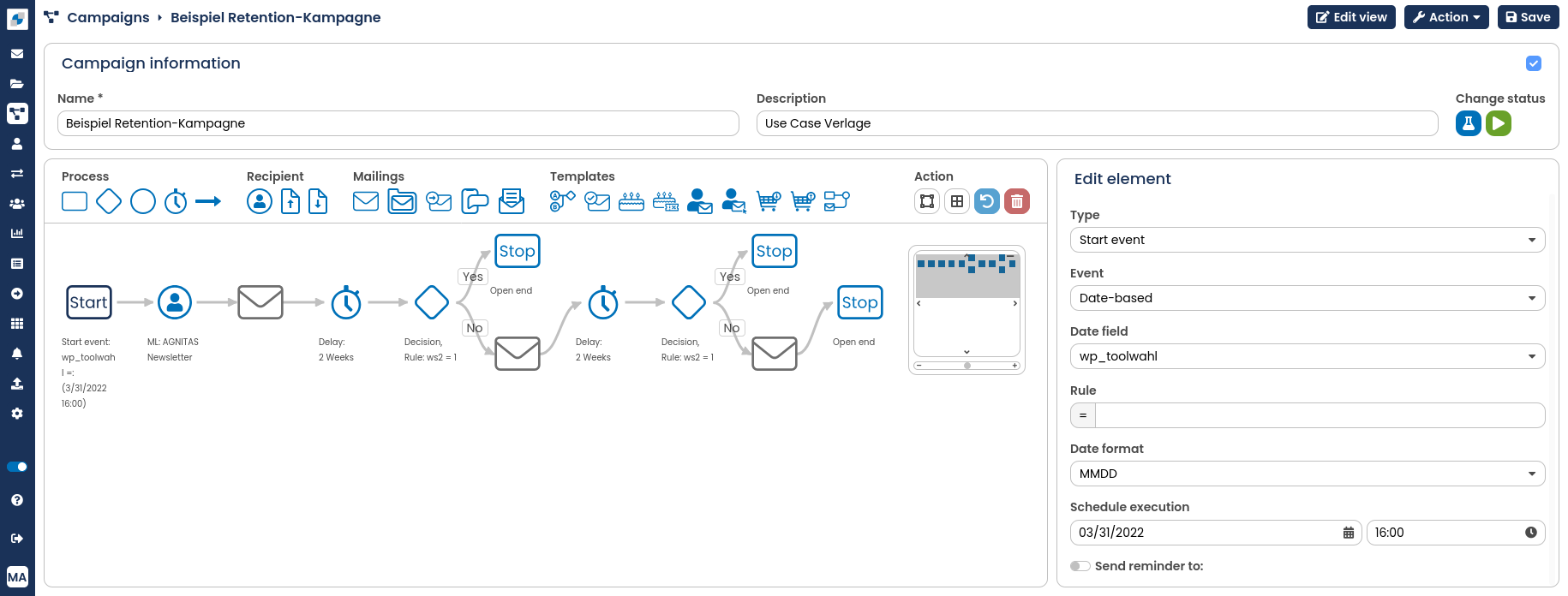
Building of workflows and campaigns with EMM's graphical drag&drop editor
For every new version of EMM we offer an extensive factsheet which lists all new features and updates to existing features in detail (like a release log). If you miss a certain factsheet, please contact your AGNITAS account manager.
If you want to learn more about EMM's architecture, please have a look at chapter EMM Architecture.