1.1 The E-Marketing Manager briefly introduced
Welcome to the quick introduction to the E-Marketing Manager of AGNITAS AG. With our push marketing platform you can professionally design your marketing campaigns, execute them, manage them and evaluate the results.
To make it as easy as possible for you to get started, we explain the most important functions here in compact form.
Content of this chapter
-
You will learn the essential functions of the E-Marketing Manager.
-
We introduce you to the main focus of the quick start.
1.1.1 Main functions
E-Marketing Manager from AGNITAS is a web-based software which, as an all-in-one solution, enables you to manage your entire campaign across multiple channels. The use of Marketing Automation allows the event-based dispatch of personalised and individualised - i.e. tailor-made - e-mails for customer acquisition and retention. Everything is possible, from individual mailings in single copies to large print runs.
Use of templates simplifies the creation of mailings
By using templates you can create your mailings - without necessarily needing to know HTML. The templates are based on two different methods: One on a drag & drop modular system and one on a placeholder system within a fixed structure. In both methods you use special AGNITAS-tags as placeholders for personalization and individualization of the contents. During production, the E-Marketing Manager merges the content from the recipient profiles with the mailing and creates a ready-to-send, individualized HTML newsletter.
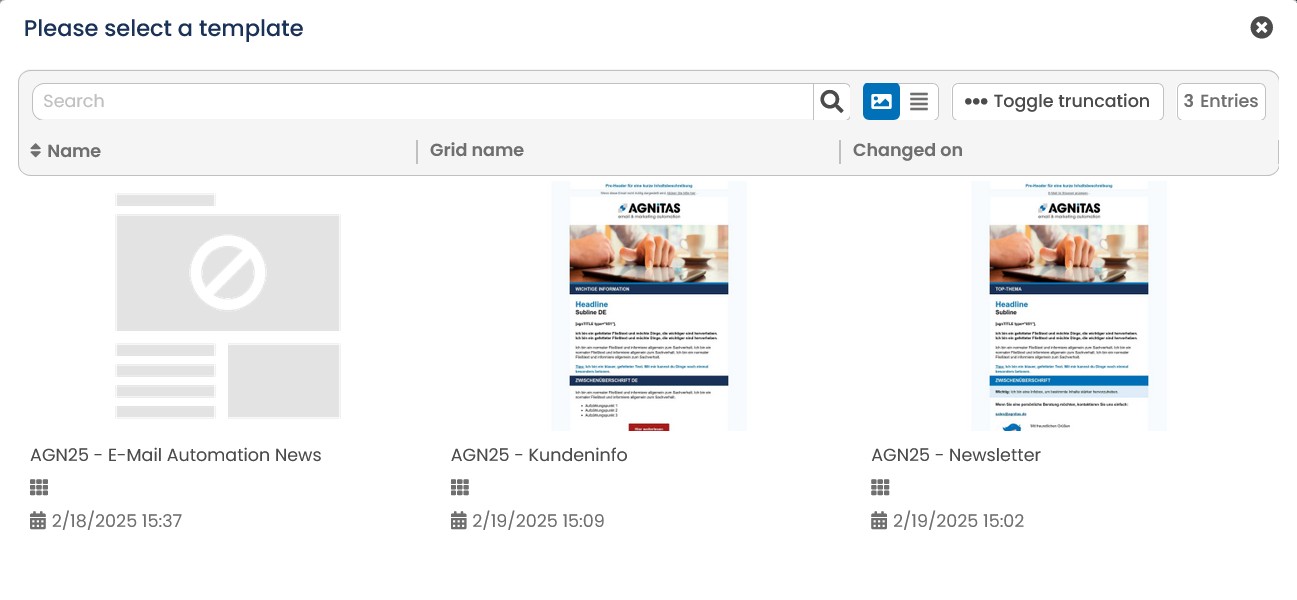
Fig. 16.1:The use of templates simplifies the creation of mailings.
Dispatching can be controlled in different ways
On the one hand, the mailings can be sent once at a specified date. On the other hand, it is also possible to send them over a longer period of time for specific occasions. The occasion can be a recipient-specific date, e.g. the date of birth, or a trigger, e.g. an order. In addition, there is also the possibility of sending mailings at a fixed interval, e.g. to invoice monthly membership fees.
Media pool for managing images, videos, PDFs and other files
The E-Marketing Manager allows you to upload the images and files you use in your mailings to the AGNITAS servers via the Media Pool and manage them in categories. In this way, retrieving the content does not create an unnecessary load on your servers. In addition to images, you can also store smaller videos, PDF attachments, JSON files or even individual fonts for your mailings.
Manager to control more complex processes
With the Campaign Manager, the E-Marketing Manager provides you with a helpful tool to visualize, execute and evaluate email cascades with different branches that build on each other. The Campaign Manager works with intuitive icons, which represent various elements of the EMM and typical process icons and integrate them into the planning.
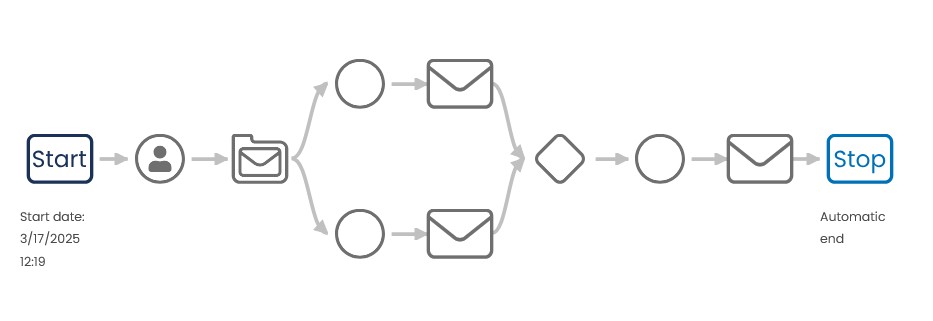
Fig. 16.2: The Campaign Manager allows the control of complex processes.
Statistics with real-time data allow immediate control of success
The statistics of the E-Marketing Manager allow a real-time evaluation and thus an immediate control of the success of your mailing. Among the most important key figures are, for example, the number of e-mails sent and delivered, the opening rate, the clickthrough rate and the distribution of clicks on the individual links as well as the turnover of an e-mailing. In addition, you have numerous other options for monitoring the success of your mailing, such as evaluating responses by end device or over time.
Recipients, target groups and mailing lists to organize your contacts
Each recipient is assigned a profile with individual characteristics that you can display, change or delete. The characteristics are stored in profile fields, which you can define as you wish. In profile fields you can, for example, store the interests of the recipient or behavior-based data such as opening, click and purchase data.
Based on the profile fields you can create target groups with specific characteristics. Target groups are dynamic filters, i.e. if a new recipient with the selected characteristics is added today, he or she automatically falls into this target group. You can supply this recipient selection with emails or special content.
Each recipient can be assigned to one or more mailing lists for which he or she has given his or her opt-in. A mailing list is equivalent to a distribution list. Several mailing lists can be used, for example, to manage the distribution lists of independent business areas (for example, B2B and B2C, customers and dealers).
Every mailing is always bound to a mailing list. The mailing list can be created by the the use of target groups should be further restricted. The target group is a filter on the respective mailing list that only takes into account recipients with the appropriate characteristics.
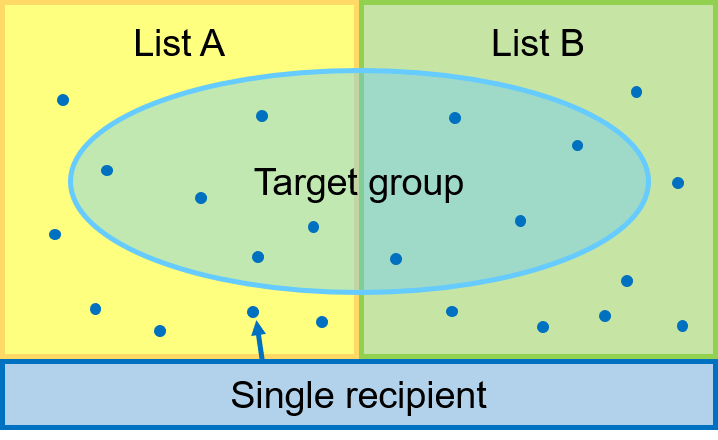
Fig. 16.3: Organizational units in e-mail marketing are recipients, target groups and mailing lists.
Forms for recipient self-management
The E-Marketing Manager also provides various forms with which interested parties and email recipients can subscribe, unsubscribe and unsubscribe themselves. The forms can be seamlessly integrated into your website. The registration process uses the legally compliant double opt-in procedure. If you link the forms for profile change or cancellation in the footer of your mailings, the recipient is able to manage his or her subscription and data himself or herself at any time. Changes are saved directly in the recipient profile and the respective mailing list. Each entry of data takes place directly via a protected connection on the AGNITAS server.
Create and update larger amounts of data via import or interface
You are welcome to create or edit individual data records by hand using the E-Marketing Manager interface. However, if you want to create or edit larger amounts of data at once, we recommend that you import the data. In this way, you can quickly and easily add existing email addresses to the E-Marketing Manager database. In addition to one-time imports, you can also use auto-imports for regularly recurring data updates, which are automatically executed according to a predefined set of rules. Another possibility for data transfer is the web service interface, which allows you to update individual data records in real time.
Of course, the data transfer also works in the opposite direction. You can export data at any time. Here, too, there is the option of using Auto export for regularly recurring exports or the Web Service interface for retrieving data.
1.1.2 Main focus e-mail
This quick start will explain how you can use theE-Marketing Manager to address your customers and leads directly via personalized and content-wise individualized campaigns. Since most users use the E-Marketing Manager to send newsletters and automated emails, the focus of the quick start is on creating mailings.
After all, email marketing is still the keyword for successful Dialogue marketing campaigns on the Internet. Our program takes care of all aspects, from entering and maintaining recipient addresses, sending high volume emails, individual handling of responses to statistical evaluation of the results.
This quick guide explains the basic functions of the E-Marketing Manager. It does not replace the manual in which you can learn about the full range of functions of the EMarketing Manager.
We will guide you step by step through the creation and dispatch of a mailing and then show you how to evaluate its results.