11.6 Form statistics
Click on the Statistics tab within a form to obtain a statistical overview of the form views and the links contained therein. At the top, under Filter, you can specify the time frame for which you would like to receive the statistics. EMM will then display the clicks and
clickers for each link in the form as well as the form views in a table (starting from the Form row). The values are displayed separately for measured and anonymous. The Grand total in the last row completes the overview. The Clicks column records all link clicks, even if a recipient clicks a link multiple times. In contrast, the Clickers column only counts the recipients who clicked, regardless of multiple views.
E-Marketing Manager differentiates in the table between measured and anonymous clicks. This can be explained as follows: A click is measured when it comes from a recipient who has called a link to a form contained in a mailing - and has not objected to tracking in mailings. Calls via a website or the direct entry of the URL as well as clicks from recipients with tracking objections, is in contrast registered as being anonymous by the program.
Please note: A value for anonymous clickers cannot be output because the anonymous clicks cannot be assigned to any recipient and it is therefore unclear how many people are behind them.
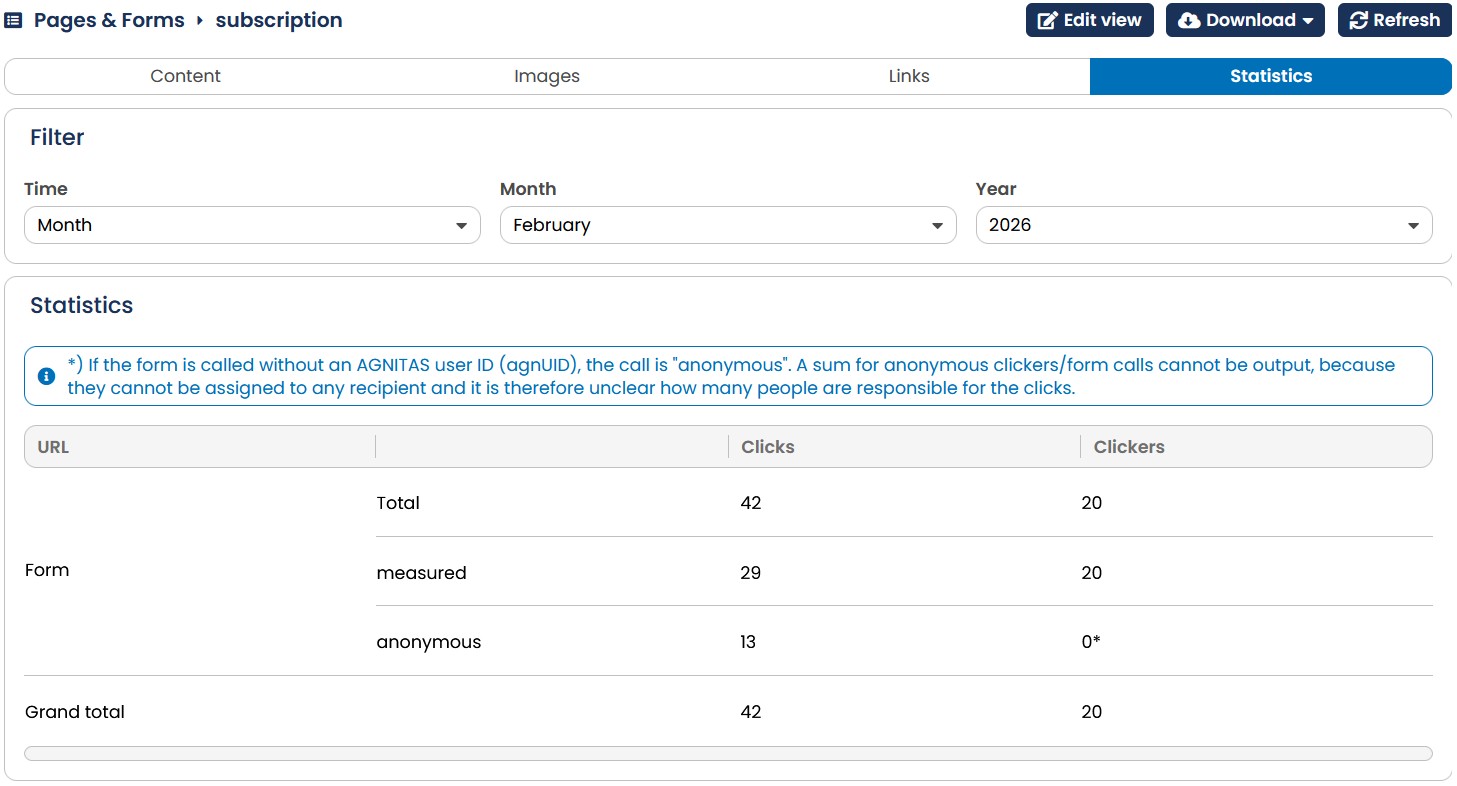
Fig. 10.10: E-Marketing Manager shows click statistics for every form and the links contained therein.
You can export the statistics data for the selected form at any time in CSV format. In order to do so, click on the save as CSV in the Download option and the storage dialog will appear.